ARCH498e, VRML Tutorials
Introduction
Tutorials
The VRML Language
VRML is the acronym for Virtual Reality Modeling Language and is a language which allows you to create three-dimensional worlds which can be navigated and linked across the World Wide Web. These worlds are viewed in a HTML browser using the proper plug-in. VMRL has its origin in 1994 during the First International Conference on the World Wide Web in Geneva Switzerland. At this conference a paper was presented by Mark Pesce and Tony Parisi concerning a 3D interface to the Web. The first version of VRML was constructed based upon the Silicon Graphics Open Inventor file format and has now moved through three versions: 1.0, 2.0 and now VRML97.
For the VRML exercise you will be working with VRML97. Before proceeding with VRML97 please read the following sections from the VRML 1.0 specifications. This will give you a good detailed introduction to the VRML language before becoming more acquainted with the technical aspects of the language.
From the VRML 1.0 Specification read the these sections:
• Introduction
• VRML Mission Statement
•History. For another, more detailed, account of the history behind the VRML modeling language see the History page at the Web3D Consortium Home page.
Once you have become acquainted with the general background and principals of the VRML you can refer to the specification for VRML97 for more details. An good on-line reference book on VRML97 is The Annotated VRML97 Reference Manual, by Rikk Carey and Gavin Bell.

With this background you should be ready to work through an on-line VRML tutorials. There are many VRML tutorials on the web. The most complete listing of tutorials is listed at The VRML Repository maintained by the San Diego Supercomputer Center. For the entire list see the VRML Repository's tutorial listing.
Of the many VRML97 tutorials one of the best is David Nadaeu's Introduction to VRML97 course notes from the VRML 98 conference. All students in ARCH498e must work through certain parts of this tutorial prior to completing the VRML97 Primitive Model Exercise. The tutorial is divided up into four parts. Although the entire tutorial is useful students should concentrate on completing the following sections:
• Part 1- Shapes, geometry, and appearance, - all sections;
• Part 3 - Textures, lights, and environment, - section "Lighting your world" only.
After you have worked through this tutorial, or even a few sections, you should be able to edit you own VRML world using Shape nodes to describe geometric primitives, and Transform nodes to alter their position, rotation or appearance. This is more than enough information for you to complete the first exercise.
To see some of the worlds that have been created buy others students of the Virtual Environments class see the CEDeS Lab Project page at the HIT Lab.
VRML is a text based three-dimensional interchange format that can contain 3D graphics and multimedia content. It is a description of a dynamic 3D world which can have behaviours and can be acted upon. This class being an introduction will concentrate on simple static 3D environments. VRML is not a programming language, and does not need to be compiled before it is run. VRML is a file format that can be parsed or read directly by a VRML browser. It can also be "read" by any one once they understand the grammer and the syntax. VRML files end with the extension .wrl for "world".
The following excerts are from the VRML97 specification:
[The] Virtual Reality Modeling Language (VRML), defines a file format that integrates 3D graphics and multimedia. Conceptually, each VRML file is a 3D time-based space that contains graphic and aural objects that can be dynamically modified through a variety of mechanisms.
Each VRML file:
An important characteristic of VRML files is the ability to compose files together through inclusion and to relate files together through hyperlinking. For example, consider the file earth.wrl which specifies a world that contains a sphere representing the earth. This file may also contain references to a variety of other VRML files representing cities on the earth (e.g., file paris.wrl). The enclosing file, earth.wrl, defines the coordinate system that all the cities reside in. Each city file defines the world coordinate system that the city resides in but that becomes a local coordinate system when contained by the earth file.
Another essential characteristic of VRML is that it is intended to be used in a distributed environment such as the World Wide Web.
A VRML file consists of the following major functional components: the header, the scene graph, the prototypes, and event routing. The contents of this file are processed for presentation and interaction by a program known as a browser.
For easy identification of VRML files, every VRML file shall begin with:
#VRML V2.0 <encoding type> [optional comment] <line terminator>
The header is a single line of ... text identifying the file as a VRML file and identifying the encoding type of the file. There shall be exactly one space separating "#VRML" from "V2.0" and "V2.0" from "<encoding type>". Also, the "<encoding type>" shall be followed by a linefeed or carriage-return character, or by one or more space or tab characters followed by any other characters, which are treated as a comment, and terminated by a linefeed or carriage-return character.
The <encoding type> is either "utf8" or any other authorized values defined in other parts of [the VRMLspec]. The identifier "utf8" indicates a clear text encoding that allows for international characters to be displayed ... using the UTF-8 encoding defined in ISO/IEC 10646-1 (otherwise known as Unicode)... The header for a UTF-8 encoded VRML file is
#VRML V2.0 utf8 [optional comment] <line terminator>
The scene graph contains nodes which describe objects and their properties. It contains hierarchically grouped geometry to provide an audio-visual representation of objects, as well as nodes that participate in the event generation and routing mechanism.
Prototypes allow the set of VRML node types to be extended by the user.
Some VRML nodes generate events in response to environmental changes or user interaction. Event routing gives authors a mechanism, separate from the scene graph hierarchy, through which these events can be propagated to effect changes in other nodes.
A generator is a human or computerized creator of VRML files. It is the responsibility of the generator to ensure the correctness of the VRML file and the availability of supporting assets (e.g., images, audio clips, other VRML files) referenced therein.
The interpretation, execution, and presentation of VRML files will typically be undertaken by a mechanism known as a browser, which displays the shapes and sounds in the scene graph. This presentation is known as a virtual world and is navigated in the browser by a human or mechanical entity, known as a user. The world is displayed as if experienced from a particular location; that position and orientation in the world is known as the viewer. The browser provides navigation paradigms (such as walking or flying) that enable the user to move the viewer through the virtual world.
In addition to navigation, the browser provides a mechanism allowing the user to interact with the world through sensor nodes in the scene graph hierarchy. Sensors respond to user interaction with geometric objects in the world, the movement of the user through the world, or the passage of time.
The visual presentation of geometric objects in a VRML world follows a conceptual model designed to resemble the physical characteristics of light.
A VRML file contains a directed acyclic graph. Node statements can contain [single-value Node] or [multi-value Node] that, in turn, contain node (or USE) statements. This hierarchy of nodes is called the scene graph. Each arc in the graph from A to B means that node A has an [Node] field whose value directly contains node B.
The descendants of a node are all of the nodes in it's... fields, as well as all of those nodes' descendants. The ancestors of a node are all of the nodes that have the node as a descendant.
[VRML97] defines the unit of measure of the world coordinate system to be metres. All other coordinate systems are built from transformations based from the world coordinate system.
| Category | Unit |
|---|---|
| Linear distance | Metres |
| Angles | Radians |
| Time | Seconds |
| Colour space | RGB ([0.,1.], [0.,1.], [0., 1.]) |
[VRML] uses a Cartesian, right-handed, three-dimensional coordinate system. By default, the viewer is on the Z-axis looking down the -Z-axis toward the origin with +X to the right and +Y straight up. A modelling transformation... or viewing transformation ... can be used to alter this default projection.
The Shape node associates a geometry node with nodes that define that geometry's appearance. Shape nodes shall be part of the transformation hierarchy to have any visible result, and the transformation hierarchy shall contain Shape nodes for any geometry to be visible (the only nodes that render visible results are Shape nodes and the Background node). A Shape node contains exactly one geometry node in its geometry field. The following node types are geometry nodes:
Several geometry nodes contain Coordinate, Color, Normal, and TextureCoordinate as geometric property nodes. The geometric property nodes are defined as individual nodes so that instancing and sharing is possible between different geometry nodes.
Shape nodes may specify an Appearance node that describes the appearance properties (material and texture) to be applied to the Shape's geometry. Nodes of the following type may be specified in the material field of the Appearance node:
Nodes of the following types may be specified by the texture field of the Appearance node:
Grouping nodes have a field that contains a list of children nodes. Each grouping node defines a coordinate space for its children. This coordinate space is relative to the coordinate space of the node of which the group node is a child. Such a node is called a parent node. This means that transformations accumulate down the scene graph hierarchy.
The following node types are grouping nodes:
Shape nodes are illuminated by the sum of all of the lights in the world that affect them. This includes the contribution of both the direct and ambient illumination from light sources. Ambient illumination results from the scattering and reflection of light originally emitted directly by light sources. The amount of ambient light is associated with the individual lights in the scene. This is a gross approximation to how ambient reflection actually occurs in nature.
The following node types are light source nodes:
All light source nodes contain an intensity, a color, and an ambientIntensity field. The intensity field specifies the brightness of the direct emission from the light, and the ambientIntensity specifies the intensity of the ambient emission from the light. Light intensity may range from 0.0 (no light emission) to 1.0 (full intensity). The color field specifies the spectral colour properties of both the direct and ambient light emission as an RGB value.
PointLight and SpotLight illuminate all objects in the world that fall within their volume of lighting influence regardless of location within the transformation hierarchy. PointLight defines this volume of influence as a sphere centred at the light (defined by a radius). SpotLight defines the volume of influence as a solid angle defined by a radius and a cutoff angle. DirectionalLight nodes illuminate only the objects descended from the light's parent grouping node, including any descendent children of the parent grouping nodes.\
Four node types specify texture maps: Background, ImageTexture, MovieTexture, and PixelTexture. In all cases, texture maps are defined by 2D images that contain an array of colour values describing the texture. The texture map values are interpreted differently depending on the number of components in the texture map and the specifics of the image format. In general, texture maps may be described using one of the following forms:
Conceptually speaking, every VRML world contains a viewpoint from which the world is currently being viewed. Navigation is the action taken by the user to change the position and/or orientation of this viewpoint thereby changing the user's view. This allows the user to move through a world or examine an object. The NavigationInfo node specifies the characteristics of the desired navigation behaviour, but the exact user interface is browser-dependent.
The browser may allow the user to modify the location and orientation of the viewer in the virtual world using a navigation paradigm. Many different navigation paradigms are possible, depending on the nature of the virtual world and the task the user wishes to perform. For instance, a walking paradigm would be appropriate in an architectural walkthrough application, while a flying paradigm might be better in an application exploring interstellar space. Examination is another common use for VRML, where the world is considered to be a single object which the user wishes to view from many angles and distances.
The NavigationInfo node has a type field that specifies the navigation paradigm for this world. The actual user interface provided to accomplish this navigation is browser-dependent.
The browser controls the location and orientation of the viewer in the world, based on input from the user (using the browser-provided navigation paradigm) and the motion of the currently bound Viewpoint node (and its coordinate system). The VRML author can place any number of viewpoints in the world at important places from which the user might wish to view the world. Each viewpoint is described by a Viewpoint node. Viewpoint nodes exist in their parent's coordinate system, and both the viewpoint and the coordinate system may be changed to affect the view of the world presented by the browser. Only one viewpoint is bound at a time.
Box {
  field    SFVec3f size  2 2 2
}
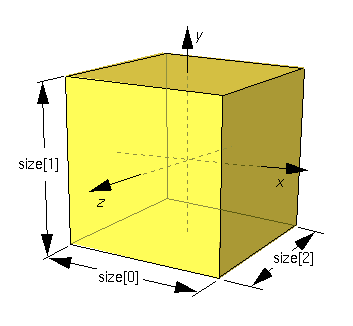
The Box node specifies a rectangular parallelepiped box centred at (0, 0, 0) in the local coordinate system and aligned with the local coordinate axes. By default, the box measures 2 units in each dimension, from -1 to +1. The size field specifies the extents of the box along the X-, Y-, and Z-axes respectively and each component value shall be greater than zero. Figure 6.2 illustrates the Box node.
Textures are applied individually to each face of the box. On the front (+Z), back (-Z), right (+X), and left (-X) faces of the box, when viewed from the outside with the +Y-axis up, the texture is mapped onto each face with the same orientation as if the image were displayed normally in 2D. On the top face of the box (+Y), when viewed from above and looking down the Y-axis toward the origin with the -Z-axis as the view up direction, the texture is mapped onto the face with the same orientation as if the image were displayed normally in 2D. On the bottom face of the box (-Y), when viewed from below looking up the Y-axis toward the origin with the +Z-axis as the view up direction, the texture is mapped onto the face with the same orientation as if the image were displayed normally in 2D. TextureTransform affects the texture coordinates of the Box.
The Box node's geometry requires outside faces only. When viewed from the inside the results are undefine
Cone {
field SFFloat bottomRadius 1 # (0, )
field SFFloat height 2 # (0,)
field SFBool side TRUE
field SFBool bottom TRUE
}
)
field SFFloat height 2 # (0,)
field SFBool side TRUE
field SFBool bottom TRUE
}
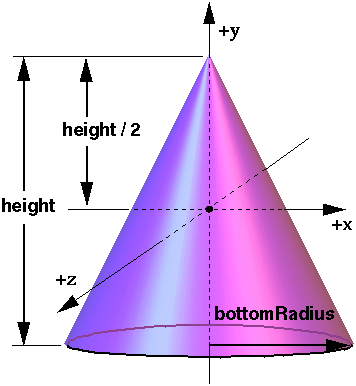
The Cone node specifies a cone which is centred in the local coordinate system and whose central axis is aligned with the local Y-axis. The bottomRadius field specifies the radius of the cone's base, and the height field specifies the height of the cone from the centre of the base to the apex. By default, the cone has a radius of 1.0 at the bottom and a height of 2.0, with its apex at y = height/2 and its bottom at y = -height/2. Both bottomRadius and height shall be greater than zero. Figure 6.3 illustrates the Cone node.
The side field specifies whether sides of the cone are created and the bottom field specifies whether the bottom cap of the cone is created. A value of TRUE specifies that this part of the cone exists, while a value of FALSE specifies that this part does not exist (not rendered or eligible for collision or sensor intersection tests).
When a texture is applied to the sides of the cone, the texture wraps counterclockwise (from above) starting at the back of the cone. The texture has a vertical seam at the back in the X=0 plane, from the apex (0, height/2, 0) to the point (0, -height/2, -bottomRadius). For the bottom cap, a circle is cut out of the texture square centred at (0, -height/2, 0) with dimensions (2 × bottomRadius) by (2 × bottomRadius). The bottom cap texture appears right side up when the top of the cone is rotated towards the -Z-axis. TextureTransform affects the texture coordinates of the Cone.
The Cone geometry requires outside faces only. When viewed from the inside the results are undefined.
Cylinder {
  field    SFBool    bottom  TRUE
  field    SFFloat   height  2         # (0,)
  field    SFFloat   radius  1         # (0,)
  field    SFBool    side    TRUE
  field    SFBool    top     TRUE
}
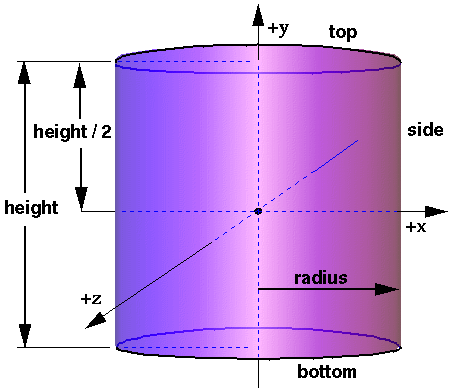
The Cylinder node specifies a capped cylinder centred at (0,0,0) in the local coordinate system and with a central axis oriented along the local Y-axis. By default, the cylinder is sized at "-1" to "+1" in all three dimensions. The radius field specifies the radius of the cylinder and the height field specifies the height of the cylinder along the central axis. Both radius and height shall be greater than zero. Figure 6.4 illustrates the Cylinder node.
The cylinder has three parts: the side, the top (Y = +height/2) and the bottom (Y = -height/2). Each part has an associated SFBool field that indicates whether the part exists (TRUE) or does not exist (FALSE). Parts which do not exist are not rendered and not eligible for intersection tests (e.g., collision detection or sensor activation).
When a texture is applied to a cylinder, it is applied differently to the sides, top, and bottom. On the sides, the texture wraps counterclockwise (from above) starting at the back of the cylinder. The texture has a vertical seam at the back, intersecting the X=0 plane. For the top and bottom caps, a circle is cut out of the unit texture squares centred at (0, +/- height/2, 0) with dimensions 2 × radius by 2 × radius. The top texture appears right side up when the top of the cylinder is tilted toward the +Z-axis, and the bottom texture appears right side up when the top of the cylinder is tilted toward the -Z-axis. TextureTransform affects the texture coordinates of the Cylinder node.
The Cylinder node's geometry requires outside faces only. When viewed from the inside the results are undefined.
Material {
  exposedField SFFloat ambientIntensity  0.2         # [0,1]
  exposedField SFColor diffuseColor      0.8 0.8 0.8 # [0,1]
  exposedField SFColor emissiveColor     0 0 0       # [0,1]
  exposedField SFFloat shininess         0.2         # [0,1]
  exposedField SFColor specularColor     0 0 0       # [0,1]
  exposedField SFFloat transparency      0           # [0,1]
}
The Material node specifies surface material properties for associated geometry nodes and is used by the VRML lighting equations during rendering. .
All of the fields in the Material node range from 0.0 to 1.0.
The fields in the Material node determine how light reflects off an object to create colour:
PointLight {
  exposedField SFFloat ambientIntensity  0       # [0,1]
  exposedField SFVec3f attenuation       1 0 0   # [0,)
  exposedField SFColor color             1 1 1   # [0,1]
  exposedField SFFloat intensity         1       # [0,1]
  exposedField SFVec3f location          0 0 0   # (-,)
  exposedField SFBool  on                TRUE
  exposedField SFFloat radius            100     # [0,)
}
The PointLight node specifies a point light source at a 3D location in the local coordinate system. A point light source emits light equally in all directions; that is, it is omnidirectional. PointLight nodes are specified in the local coordinate system and are affected by ancestor transformations.
A PointLight node illuminates geometry within radius metres of its location. The radius field shall be greater than or equal to zero.
PointLight node's illumination falls off with distance as specified by three attenuation coefficients. The default is no attenuation. An attenuation value of (0, 0, 0) is identical to (1, 0, 0). Attenuation values shall be greater than or equal to zero.
Shape {
  exposedField SFNode appearance NULL
  exposedField SFNode geometry   NULL
}
The Shape node has two fields, appearance and geometry, which are used to create rendered objects in the world. The appearance field contains an Appearance node that specifies the visual attributes (e.g., material and texture) to be applied to the geometry. The geometry field contains a geometry node. The specified geometry node is rendered with the specified appearance nodes applied.
Sphere {
  field SFFloat radius  1
}
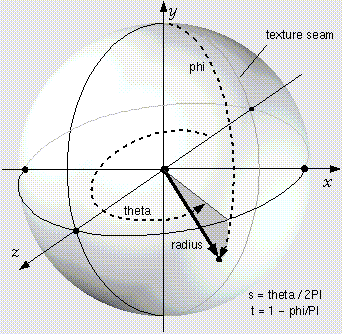
The Sphere node specifies a sphere centred at (0, 0, 0) in the local coordinate system. The radius field specifies the radius of the sphere and shall be greater than zero. Figure 6.15 depicts the fields of the Sphere node.
When a texture is applied to a sphere, the texture covers the entire surface, wrapping counterclockwise from the back of the sphere (i.e., longitudinal arc intersecting the -Z-axis) when viewed from the top of the sphere. The texture has a seam at the back where the X=0 plane intersects the sphere and Z values are negative. TextureTransform affects the texture coordinates of the Sphere.
The Sphere node's geometry requires outside faces only. When viewed from the inside the results are undefined.
SpotLight {
exposedField SFFloat ambientIntensity 0 # [0,1]
exposedField SFVec3f attenuation 1 0 0 # [0,)
exposedField SFFloat beamWidth 1.570796 # (0, /2]
exposedField SFColor color 1 1 1 # [0,1]
exposedField SFFloat cutOffAngle 0.785398 # (0,/2]
exposedField SFVec3f direction 0 0 -1 # (-,)
exposedField SFFloat intensity 1 # [0,1]
exposedField SFVec3f location 0 0 0 # (-,)
exposedField SFBool on TRUE
exposedField SFFloat radius 100 # [0,)
}
/2]
exposedField SFColor color 1 1 1 # [0,1]
exposedField SFFloat cutOffAngle 0.785398 # (0,/2]
exposedField SFVec3f direction 0 0 -1 # (-,)
exposedField SFFloat intensity 1 # [0,1]
exposedField SFVec3f location 0 0 0 # (-,)
exposedField SFBool on TRUE
exposedField SFFloat radius 100 # [0,)
}
The SpotLight node defines a light source that emits light from a specific point along a specific direction vector and constrained within a solid angle. Spotlights may illuminate geometry nodes that respond to light sources and intersect the solid angle defined by the SpotLight. Spotlight nodes are specified in the local coordinate system and are affected by ancestors' transformations.
The location field specifies a translation offset of the centre point of the light source from the light's local coordinate system origin. This point is the apex of the solid angle which bounds light emission from the given light source. The direction field specifies the direction vector of the light's central axis defined in the local coordinate system.
The on field specifies whether the light source emits light. If on is TRUE, the light source is emitting light and may illuminate geometry in the scene. If on is FALSE, the light source does not emit light and does not illuminate any geometry.
The radius field specifies the radial extent of the solid angle and the maximum distance from location that may be illuminated by the light source. The light source does not emit light outside this radius. The radius shall be greater than or equal to zero.
Both radius and location are affected by ancestors' transformations (scales affect radius and transformations affect location).
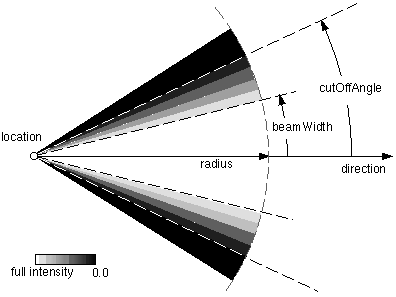
The cutOffAngle field specifies the outer bound of the solid angle. The light source does not emit light outside of this solid angle. The beamWidth field specifies an inner solid angle in which the light source emits light at uniform full intensity. The light source's emission intensity drops off from the inner solid angle (beamWidth) to the outer solid angle (cutOffAngle) as described in the following equations:
    angle = the angle between the Spotlight's direction vector
            and the vector from the Spotlight location to the point
            to be illuminated

    if (angle >= cutOffAngle):
        multiplier = 0
    else if (angle <= beamWidth):
        multiplier = 1
    else:
        multiplier = (angle - cutOffAngle) / (beamWidth - cutOffAngle)

    intensity(angle) = SpotLight.intensity × multiplier
If the beamWidth is greater than the cutOffAngle, beamWidth is
defined to be equal to the cutOffAngle and the light source emits full intensity
within the entire solid angle defined by cutOffAngle. Both beamWidth and cutOffAngle
shall be greater than 0.0 and less than or equal to /2. Figure 6.16
depicts the beamWidth, cutOffAngle, direction, location, and radius
fields of the SpotLight node.
SpotLight illumination falls off with distance as specified by three attenuation coefficients. The attenuation factor is 1/max(attenuation[0] + attenuation[1]×r + attenuation[2]×r2 , 1), where r is the distance from the light to the surface being illuminated. The default is no attenuation. An attenuation value of (0, 0, 0) is identical to (1, 0, 0). Attenuation values shall be greater than or equal to zero. A detailed description of VRML's lighting equations is contained in 4.14, Lighting model.
Transform {
  eventIn      MFNode      addChildren
  eventIn      MFNode      removeChildren
  exposedField SFVec3f     center           0 0 0    # (-,)
  exposedField MFNode      children         []
  exposedField SFRotation  rotation         0 0 1 0  # [-1,1],(-,)
  exposedField SFVec3f     scale            1 1 1    # (0,)
  exposedField SFRotation  scaleOrientation 0 0 1 0  # [-1,1],(-,)
  exposedField SFVec3f     translation      0 0 0    # (-,)
  field        SFVec3f     bboxCenter       0 0 0    # (-,)
  field        SFVec3f     bboxSize         -1 -1 -1 # (0,) or -1,-1,-1
}
The Transform node is a grouping node that defines a coordinate system for its children that is relative to the coordinate systems of its ancestors.
The bboxCenter and bboxSize fields specify a bounding box that encloses the children of the Transform node. This is a hint that may be used for optimization purposes. The results are undefined if the specified bounding box is smaller than the actual bounding box of the children at any time. A default bboxSize value, (-1, -1, -1), implies that the bounding box is not specified and, if needed, shall be calculated by the browser. The bounding box shall be large enough at all times to enclose the union of the group's children's bounding boxes; it shall not include any transformations performed by the group itself (i.e., the bounding box is defined in the local coordinate system of the children). The results are undefined if the specified bounding box is smaller than the true bounding box of the group.
The translation, rotation, scale, scaleOrientation and center fields define a geometric 3D transformation consisting of (in order):
The center field specifies a translation offset from the origin of the local coordinate system (0,0,0). The rotation field specifies a rotation of the coordinate system. The scale field specifies a non-uniform scale of the coordinate system. scale values shall be greater than zero. The scaleOrientation specifies a rotation of the coordinate system before the scale (to specify scales in arbitrary orientations). The scaleOrientation applies only to the scale operation. The translation field specifies a translation to the coordinate system.